
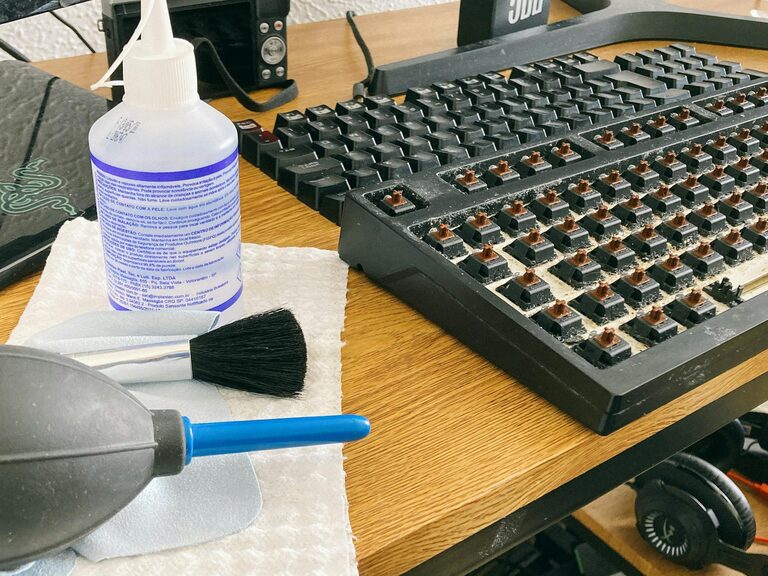
Keeping your phone and keyboard clean is essential for both hygiene and device longevity. These everyday tools accumulate dust, oils, and germs, which can affect performance and increase the risk of illness. However, cleaning them improperly can cause damage. This guide provides clear, safe steps to clean your phone and keyboard effectively.
Why Clean Your Phone and Keyboard?
Phones and keyboards are among the most frequently touched devices. Throughout the day, they collect:
– Oils and sweat from your skin
– Dust and dirt from the environment
– Food crumbs and debris (especially around keyboards)
– Bacteria and viruses that can lead to illness
Regular cleaning helps maintain device performance and reduces the spread of germs.
What You’ll Need
Before you begin, gather these supplies:
– Microfiber cloths (soft and lint-free)
– Isopropyl alcohol (70% or less) or screen-safe cleaning spray
– Cotton swabs or Q-tips
– Compressed air canister (for keyboard debris)
– Small soft brush (optional)
– Distilled water (optional)
Avoid harsh chemicals like bleach, ammonia, or abrasive cleaners, as they can damage device surfaces.
—
# How to Clean Your Phone Safely
Phones have delicate screens and openings that require gentle cleaning.
Step 1: Power Off Your Phone
Turn off your device and unplug any cables to avoid damage or short circuits.
Step 2: Remove the Case
Take off the phone case and clean it separately with soap and water or an appropriate cleaner.
Step 3: Clean the Screen and Body
– Lightly dampen a microfiber cloth with a solution of equal parts distilled water and isopropyl alcohol.
– Gently wipe the screen and phone body without applying excessive pressure.
– Avoid getting moisture in any openings like the charging port, speakers, or buttons.
Step 4: Use Cotton Swabs for Tight Areas
Dip a cotton swab in the cleaning solution and carefully clean around the camera lens, speaker grills, and ports.
Step 5: Dry and Reassemble
Use a dry microfiber cloth to remove any leftover moisture. Wait a few minutes before putting the case back on and powering the phone on.
—
# How to Clean Your Keyboard Safely
Whether using a laptop or an external keyboard, dust and grime accumulate between the keys.
Step 1: Turn Off and Unplug the Keyboard
Disconnect the keyboard from your computer or turn off your laptop.
Step 2: Remove Loose Debris
– Flip the keyboard upside down and gently shake it to dislodge crumbs.
– Use a can of compressed air to blow out dust from between keys—hold the can upright and use short bursts.
Step 3: Clean the Key Surfaces
– Lightly dampen a microfiber cloth or cotton swab with isopropyl alcohol (preferably 70% or less).
– Wipe over each key and the keyboard surface. Avoid soaking the cloth to prevent liquid from seeping under keys.
Step 4: Use a Soft Brush for Stubborn Dirt
If debris remains, use a small soft brush to sweep away grime around and between keys.
Step 5: Let It Dry Before Use
Ensure the keyboard is completely dry before reconnecting or powering on.
—
# Tips for Maintaining Clean Devices
– Wash your hands regularly to minimize grease and dirt transfer.
– Avoid eating near your phone or keyboard.
– Clean your devices weekly, or more often in high-use scenarios.
– Use keyboard covers or screen protectors for easier cleaning.
– Store your phone and keyboard in clean, dust-free areas when not in use.
—
# When to Avoid DIY Cleaning
If your device has experienced liquid damage, or if you notice malfunctioning buttons or screen issues, seek professional repair advice before attempting cleaning.
—
# Conclusion
Cleaning your phone and keyboard doesn’t have to be complicated. By using gentle methods and the right supplies, you can keep your gadgets hygienic and functioning well. Regular care prolongs device life and provides a healthier experience every day. Make device cleaning a simple routine and enjoy a cleaner workspace and digital life!